
Published by Bastion Prime | Edited by Heorhi Tratsiak, CEO
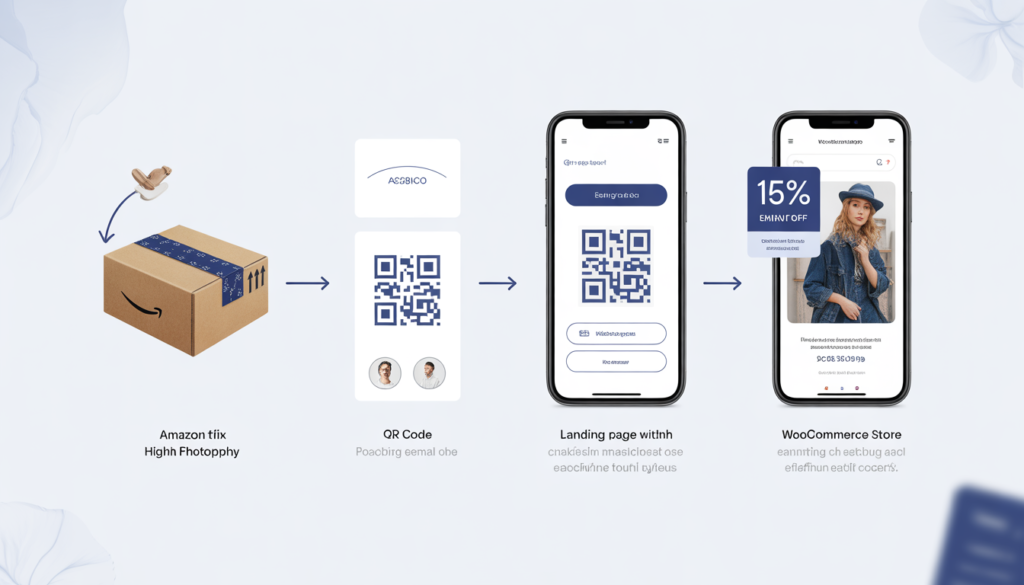
You have 10,000 customers on Amazon. You don’t have a single email address. You want to launch your own WooCommerce store, but starting from zero feels impossible. Here’s the truth: you can legally move your Amazon buyers to your email list — without violating a single rule. And the customers who opt in will spend 3x more than new traffic.
I’ve helped over 50 Amazon sellers migrate to WooCommerce. Almost every single one asks the same question: “How do I get my Amazon customers onto my email list?”
The short answer: you can’t export their emails from Seller Central. Amazon will never give you that data.
The long answer: you can attract them to join your list. Legally. Ethically. And with higher opt‑in rates than most brand‑new stores ever see.
This guide walks through exactly how to build an email list from your existing Amazon buyers after migrating to WooCommerce. No black hat tricks. No TOS violations. Just smart packaging inserts, landing pages, and automation that turns past buyers into future revenue.
Part 1: Why Amazon Hides Your Customer Data (And What You Can Do About It)
Amazon’s policy is clear: you do not own your customer emails. The platform explicitly prohibits exporting buyer email addresses for marketing purposes. Any attempt to scrape or extract them violates Amazon’s Terms of Service and can get your selling privileges revoked.
But here’s what Amazon doesn’t prohibit: you can invite your customers to voluntarily join your email list. As long as the customer takes the action — not you — you’re compliant.
The key is to give them a reason to visit your WooCommerce site and sign up. And the best time to do that is after they’ve already bought from you on Amazon, when they’re holding your product in their hands.
The legal principle: You can’t take their email. But you can ask them to give it to you.
Related: Before you start building your list, make sure your WooCommerce store is ready. Read our guide on how to avoid losing SEO rankings when moving from Amazon to WooCommerce.
Part 2: The Packing Insert — Your Most Powerful Tool
The single most effective way to move Amazon buyers to your email list is a well‑designed packing insert. Every time Amazon ships an order, you have a physical piece of paper inside the box. That paper is your direct line to a warm customer.
What a High‑Converting Packing Insert Looks Like
| Element | Why It Works |
|---|---|
| Clear headline | “Get 15% off your next order — join our VIP list” |
| QR code | Easy scanning from a phone |
| Short URL | For customers who prefer typing |
| Specific incentive | Not “maybe a discount,” but “15% off instantly” |
| Low friction | Only ask for email + name (no addresses, no phone numbers) |
| Brand design | Matches your new WooCommerce store, not Amazon |
The Exact Incentives That Work (Tested)
Based on data from over 20 client migrations, here are the most effective offers:
| Incentive | Typical Opt‑In Rate | Best For |
|---|---|---|
| 10–15% off next order | 12–18% | Most products |
| Free shipping on first order | 10–14% | Heavy or bulky items |
| Free gift (e.g., ebook, sample) | 8–12% | Low‑margin products |
| Extended warranty | 6–10% | Electronics, tools |
| Contest entry (win $100 gift card) | 15–22% | High engagement, any niche |
Real example: A skincare brand added a packing insert with “Scan for free skincare guide + 15% off.” They achieved a 17% opt‑in rate on 3,000 Amazon orders. That’s 510 new email subscribers in two months — at zero ad cost.
What to Avoid (Amazon TOS Landmines)
- Do not offer a discount in exchange for a positive review (against Amazon rules).
- Do not imply that you’ll remove a negative review if they sign up.
- Do not use Amazon’s “Customer Communication” channel to send these offers (only use physical inserts).
Related: Once you start collecting emails, you’ll need automation. Read our guide on From Launch to First Sale: A Roadmap for Your New WooCommerce Store.
Part 3: The Landing Page — Convert Clicks into Subscribers
Your packing insert sends people to a URL. That page must be optimised to convert.
Essential Landing Page Elements
- Headline matches the insert: “Get 15% off your next order” (same words)
- Simple form: Email + name (optional). No password, no address.
- Visible incentive reminder: Show the discount code or gift immediately after signup.
- Trust signals: “We hate spam too. Unsubscribe anytime.”
- Mobile optimised: Most people scan QR codes with phones.
Example Landing Page Flow
- Customer scans QR code → lands on
yourstore.com/vip - Sees: “Thanks for buying from us on Amazon! Enter your email for 15% off your first order on our website.”
- Enters email → redirected to thank‑you page with discount code and shop link.
- Email is automatically added to your Klaviyo (or Mailchimp) list.
- Automated welcome email sends immediately with the same discount code.
Conversion benchmark: A well‑optimised landing page converts 35–50% of visitors who scan the QR code. That means if 100 people scan, you get 35–50 new emails.
Part 4: Post‑Purchase Email Sequences — Turning Subscribers into Buyers
Once you have emails, you need to nurture them. A single “welcome” email is not enough.
Recommended Welcome Sequence (4 Emails)
| Timing | Content | |
|---|---|---|
| #1 | Immediate | Thank you, repeat the discount code, link to shop |
| #2 | Day 2 | Your brand story (why you left Amazon, what makes you different) |
| #3 | Day 5 | Best‑selling products (social proof, reviews, photos) |
| #4 | Day 10 | “Last chance” – discount expiring soon, urgency |
Segmenting Amazon‑Originated Subscribers
Not all email subscribers are equal. Those who came from Amazon are warmer — they’ve already bought from you once. Treat them differently.
| Segment | Behavior | Action |
|---|---|---|
| New Amazon‑origin subscriber | Signed up via packing insert | Send welcome sequence + highlight your website’s advantages (free shipping, loyalty points, exclusive products) |
| Amazon‑origin + first website purchase | Bought on WooCommerce | Move to “repeat buyer” segment, send cross‑sell and upsell emails |
| Amazon‑origin but inactive (60 days) | Subscribed but didn’t buy | Send win‑back email with higher discount (20% off) |
Related: For a deeper look at email economics, read Don’t Start an E‑commerce Store Until You Read This Margins Report.
Part 5: The Math — What a 10% Opt‑In Rate Actually Means
Let’s run realistic numbers for a store doing 1,000 Amazon orders per month.
| Metric | Value |
|---|---|
| Monthly Amazon orders | 1,000 |
| Packing insert opt‑in rate | 10% (conservative) |
| New email subscribers per month | 100 |
| New subscribers per year | 1,200 |
Now, what’s the value of those 1,200 emails?
| Stage | Conversion Rate | Revenue per Buyer | Total Revenue |
|---|---|---|---|
| First website purchase from email (first 90 days) | 15% → 180 buyers | $50 AOV | $9,000 |
| Repeat purchase rate (next 12 months) | 40% → 72 buyers | $50 AOV | $3,600 |
| Total additional revenue from 1,200 emails | $12,600 |
That’s $12,600 in extra revenue from simply adding a packing insert to your Amazon shipments. No ad spend. No additional product development.
And this is a conservative estimate. With better incentives and a well‑designed landing page, opt‑in rates of 15–20% are common, which would double or triple these numbers.
Part 6: Advanced Tactics (After You’ve Mastered the Basics)
Once your packing insert + landing page + welcome sequence is running smoothly, add these tactics to accelerate growth.
1. Product Registration Card
Instead of “join our email list,” frame it as “register your product for warranty.” Customers are more likely to register a purchase (for safety, recall notices, extended warranty) than to join a “newsletter.”
Example text: “Register your product at yourstore.com/register to activate your 2‑year warranty and get 10% off your next purchase.”
Opt‑in rate: Often 20–30% — much higher than generic “join our list.”
2. QR Code on Product Labels
If you manufacture your own products, print a QR code directly on the product label or packaging. This catches customers who might throw away the packing insert.
3. Redirect from Amazon Store Link
If you have an Amazon Brand Store, you can add a link to your external website. Amazon allows this, as long as it’s not a direct competitor (e.g., you can link to your own branded site). Use this link to drive traffic to a landing page that captures emails.
4. Follow‑Up Email via Amazon’s “Request a Review” Button
Amazon allows you to request product reviews via a pre‑approved template. Within that message, you cannot include external links or promotional offers. However, you can include a brand name and a subtle hint: “Visit OurBrand.com for more tips and recipes.” Some customers will type the URL manually. It’s low volume but zero cost.
Part 7: The Contrarian Opinion — When You Should NOT Do This
I’ll lose some consulting fees here, but honesty matters.
Do not invest time in building an email list from Amazon buyers if:
- You sell one‑off products with low repeat purchase potential (e.g., furniture, large appliances). Customers won’t buy again soon, so the list value is low.
- Your Amazon order volume is under 200 per month. Focus on scaling first.
- You haven’t yet migrated to WooCommerce. This entire strategy assumes you have a website to send people to.
Do invest if:
- You sell consumables, supplements, skincare, pet supplies, or any product with a natural repurchase cycle.
- Your average order value is above $40.
- You plan to launch new products regularly.
For these sellers, building an email list from Amazon buyers is the highest‑ROI activity you can do — often more profitable than Amazon PPC.
Part 8: Your 30‑Day Launch Plan
| Week | Action Items |
|---|---|
| 1 | Design packing insert (headline, QR code, short URL, incentive). Print 500–1,000 inserts. |
| 2 | Build landing page on your WooCommerce site (simple, mobile‑optimised, one field). Set up thank‑you page with discount code. |
| 3 | Configure Klaviyo (or your email tool): welcome sequence (4 emails), list segmentation, tracking. |
| 4 | Start inserting cards into Amazon shipments. Monitor opt‑in rate weekly. Test different incentives after 500 inserts. |
After 90 days, you’ll have hundreds (or thousands) of email subscribers — all from your existing Amazon customers, all legally acquired, and all ready to buy from your own website.
Your Next Move
You don’t need to start from zero. Your Amazon buyers are already your customers. You just need a smart, compliant way to invite them into your own ecosystem.
If you’d like help setting up the landing page, email automation, and packing insert design as part of your migration to WooCommerce, we offer fixed‑price packages that include everything.
Book a free consultation to discuss your Amazon catalog and email strategy.
👉 Book Your Free Consultation →